16 February 2015

The Daily Beast: Hacking Ring Steals Up To $1B From Banks.

An international hacking ring that's been active since at least the end of 2013 has stolen up to $1 billion from banks around the world, according to a cybersecurity firm report released Monday.

The group has breached more than 100 banks in 30 countries through methods including programming ATMs to release money at certain times and transferring money to fake accounts, according to Russian security company Kaspersky Lab. The hackers become familiar with banks' systems through phishing, taking screen shots as well as filming employees using work computers, the report said.

The theft targets banks instead of customers, which means the hackers are focused on stealing money rather than information, according to Kaspersky principal security researcher Vicente Diaz.

Financial institutions in the U.S., Russia, Germany, China and Ukraine have been targeted, but the hackers may be casting a bigger net to include banks in Africa and Europe. 

Source: http://google.com/newsstand/s/CBIw68zrvyA

23 November 2014

A deep look into the Brazilian underground cyber-market


Trend Micro has published a new study on black cyber-markets focusing on product and services offered on the Brazilian underground.

Trend Micro has published a new interesting report on the underground cyber-markets, this is a third study focused on the Brazilian cyber-underground offer, the previous ones analyzed Russian and Chinese marketplaces.
The new study, exactly like previous analysis, describes a thriving marketplace where cyber criminals proposes their services and products to criminal crews that instead of creating their own attack tools from scratch could benefit of the competitive offer. The study reports the principal solution and services proposed to the crooks in a model of sale known as crime-as-a-service that is able to attract new actors in the cyber arena.
A first data that immediately catches the attacention of the experts is decrease of prices recently offered, this is a further element of attractive for criminals that look to the cyber crime with increasing interest.
“The barriers to launching cybercrime have decreased. Toolkits are becoming more available and cheaper; some are even offered free of charge. Prices are lower and features are richer. Underground forums are thriving worldwide, particularly in Russia, China, and Brazil. These have become popular means to sell products and services to cybercriminals in the said countries. Cybercriminals are also making use of the Deep Web to sell products and services outside the indexed or searchable World Wide Web, making their online “shops” harder for law enforcement to find and take down.” states the ‘The Brazilian Underground Market’ report.
Another element of distinction between the Brazilian underground and the Russian and Chinese ones, is the availability of training services, for this reason the Brazilian underground ecosystem is also considered as the market for cybercriminal Wannabes.
“What distinguishes the Brazilian underground from others is the fact that it also offers training services for cybercriminal wannabes,” according to the whitepaper. “Cybercriminals in Brazil particularly offer FUD (fully undetectable) crypter programming and fraud training by selling how-to videos and providing support services via Skype. Anyone who is Internet savvy and has basic computing knowledge and skill can avail of training services to become cybercriminals. How-to videos and forums where they can exchange information with peers abound underground. Several trainers offer services as well. They even offer support when training ends.”
The Brasilian cyber criminals seem to be more ruthless in the use of media platforms like Facebook, YouTube, Twitter, Skype, and WhatsApp, differently from Russian and Chinese players that “hide in the Deep Web and use tools that ordinary users do not such as Internet Relay Chat (IRC) channels”

For several years, Brazil has been known for the offer of banking Trojans, many malware were designed by Brazilian which targeted internal banking users and that implemented several techniques to steal victims’
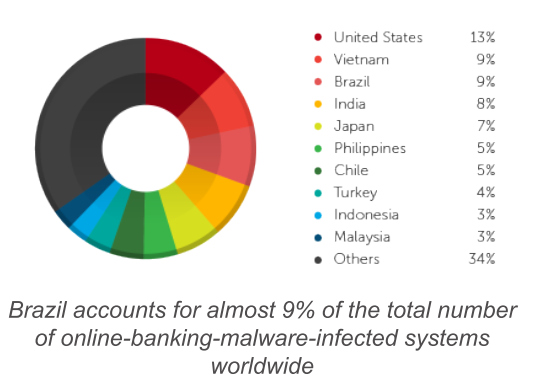
credentials. Brazil ranks second worldwide in terms of online banking fraud and malware infection, on a global scale it accounts for almost 9% of the total number of online-banking malicious code that compromised

Brazilian underground banking malware
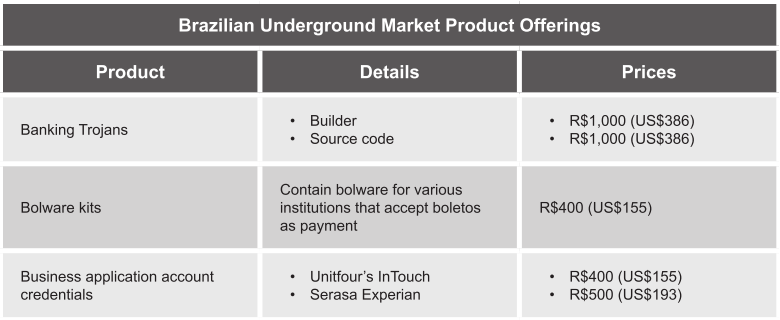
Banking Trojan source codes are sold for around US$386 each, the offer allows buyers to modify their codes according their needs, they can obfuscate strings, customize the composition of payloads and add crypters and other solution to evade the detection. Another product very popular are  Bolware kits and toolkits used to create bolware that are offered for around US$155, the applications offered by cybercriminals are user-friendly and implements an easy to use control panel for monitoring and managing infections and malicious activities.
Brazilian underground banking malware prices
The Brazilian underground also offers a bank fraud courses for aspiring cyber-criminals, the courses are very articulated and propose detailed information for beginners to the criminal activities. The courses starts presenting the fraud workflow and tools necessary to arrange a cyber fraud. Some coursed are arranged in modules that propose interesting information on the illegal practices to cybercriminal wannabes that can acquire also interactive guides and practical exercises (e.g., simulating attacks). A 10-module corse for example is offered for US$468, the operators also offer updates and a Skype contact service.
According to the author of the study on the Brazilian underground market, Trend Micro Senior Threat Researcher Fernando Merces, several factors have contributed to the growth of cyber-criminal activity in the country like limited resources assigned to law enforcement and the existence of a flexible underground market.
“For example, Brazil has a lack of concrete laws and limited law enforcement agency resources that address cybercrime in the country,” he noted. “Additionally, the technological and consumer landscape in Brazil, which has a 50% Internet penetration rate, and a 69% credit card penetration rate, has made the country all too appealing for cybercriminals. However, another factor may have also contributed to Brazilian cybercrime: the existence of a flexible underground market with different offerings, ranging from banking Trojan development to online fraud training. The latter is highly notable as this is the most unique item in the market, which may not be found in other underground markets.” explained Merces in a blog post.  
The report details prices and products for many other products and services, including Credit card credentials and number generators, SMS-spamming services and  phishing pages for popular banks.
Let me close the post with a meaningful statement from the author of the study that explain how is simple today to become a dangerous cyber criminals with limited resources.
“In Brazil, it’s possible to start a new career in cybercrime armed with only US$500,” Merces blogged. “Would-be cybercriminals are supported and helped by tools, forums, and experts from the dark side of the Internet. These bad guys do not fear the authorities and their groups get bigger in a short span of time.”
Let me suggest you to read the full report published by Trend Micro, it is full of interesting data.

(Security Affairs –  Brazilian underground, cybercrime)


View article...

06 November 2014

New technique makes phishing sites easier to create, more difficult to spot.


Posted on 05 November 2014.

Researchers have spotted a new technique used by phishers which could trick even more users into believing they are entering their information in a legitimate web form.

Instead of replicating as faithfully as possible a legitimate website - for example an e-commerce site - the attackers need only to set up a phishing page with a proxy program which will act as a relay to the legitimate site, and create a few fake pages for when users need to enter their personal and financial information.


"So long as the would-be-victim is just browsing around the site, they see the same content as they would on the original site. It is only when any payment information is entered that modified pages are displayed to the user," Trend Micro Senior Threat Researcher Noriaki Hayashi explains.

"It does not matter what device (PC/laptop/smartphone/tablet) or browser is used, as the attacker proxies all parts of the victim’s HTTP request and all parts of the legitimate server’s response."

In the spotted attack, users are directed to the malicious site by clicking on a search result they got by entering a product's name. The attackers used a number of blackhat SEO techniques to make the URL appear in the results. But spam emails and messages can also be used to lure potential victims to the malicious site.

The actual attack begins when the user clicks on the “Add to Basket” button on the legitimate site - the attacker has re-written the function so that the user is redirected to a spoofed e-cart page that leads to more fake pages simulating the checkout process.

The first page asks the victims to enter their personal information (name, address, phone number) as well as their email address and password. The second one requests the entry of credit card information (including the card's security code). The third one asks for additional information that is sometimes required to authorize a transaction.

Once the victims have submitted all this information, they will receive a fake confirmation email for the purchase to the email address submitted - and the illusion is complete.

"So far, we have only identified this attack targeting one specific online store in Japan. However, if this attack becomes more prominent, it could become a very worrying development: this makes phishing harder to detect by end users, as the phishing sites will be nearly identical to the original sites," Hayashi noted.

This approach makes phishing websites much easier to set up, and very difficult for the owners of the legitimate websites to detect. 

Undoubtedly, we'll be seeing more similar attacks in the future.


12 October 2014

How To Protect Yourself From Phishing Scams


By: Nadia_Kovacs            Posted: 30-Sep-2014 | 10:16AM 

October is National Cyber Security Awareness month. Phishing is one of the oldest tricks in the Internet book that tries to trick you out of divulging your personal information. This is part 4 in a series of blog posts we will be publishing on various topics aimed at educating you on how to stay protected on today’s Internet landscape.

Phishing is essentially an online con game and phishers are nothing more than tech-savvy con artists and identity thieves. They use SPAM, malicious web sites, email messages and instant messages to trick people into divulging sensitive information, such as bank and credit card accounts, usernames and passwords.

How Do You Know It’s A Scam?

There are different forms of phishing tactics. Criminals may try to trick you into giving away your personal information via emails, Social Media messages, IMs, text messages, and even Internet chat rooms. Sometimes criminals may try to fool you into installing a malicious program, known as spyware, which can track and record the information you enter into your computer. Below are some of the commonly used tactics and warning signs you should be on the lookout for:

  • Phishers, pretending to be legitimate companies, may use email to request personal information and direct recipients to respond through malicious websites. Phishers have been known to use real company logos, and will also use a spoofed email address, which is an email address that is similar to the actual company’s address. However, the address may be misspelled slightly or come from a spoofed domain.
  • Emails may come in the form of a help desk support ticket, a message from your bank, or from someone soliciting money via a 419 scam.
  • Phishers tend to use a call to action. You may get a notice that an account is being shut down and you need to log into it to avoid that from happening. They may also request personal information in order to verify your identity.
  • Phishing websites can look remarkably like legitimate sites because they tend to use the copyrighted images the original sites.
  • Fraudulent messages are often not personalized and will often have misspellings of words and company names.

How Do You Know If You Have Spyware?

Spyware can be downloaded from web sites, email messages, instant messages, and from direct file-sharing connections. Additionally, a user may unknowingly receive spyware by installing a software program, and the spyware piggybacks onto that installation as additional suggested software. Users may also be unaware that some browser add-ons contain spyware.

Spyware frequently attempts to remain unnoticed, either by actively hiding or by simply not making its presence on a system known to the user. However, sometimes there can be signs that you may be infected:

  • Your computer starts to run slower than usual.
  • You start to receive an unusual amount of pop up ads.
  • There are new toolbars on your browser that you did not install.
  • Your browser’s home page has changed to a page that you are unfamiliar with.
  • Your web searches become redirected to other spam sites.

How Do I Avoid Spyware?

  • Be selective about what you download to your computer.
  • Watch out for anti-spyware scams.
  • Beware of clickable ads.
  • Use Norton Security to provide anti-spyware protection and proactively protect from other security risks.
  • Do not accept or open suspicious error dialogs from within the browser.
  • Spyware may come as part of a "free deal" offer - do not accept free deals.
  • Keep software and security patches up to date.

How Do I Protect My Privacy?

If you happen to run across any of these red flags, here are some tips to keep yourself safe and protect your privacy:

  • Never give out any personal information via email, social media platforms, text messages or instant messages.
  • If the call to action is to click on a link and sign into the site with your username and password, never click on the link. Instead, go to your web browser and type in the website’s URL. Be sure to look for the verified https:/ at the beginning of the URL in the task bar.
  • Never download a program or file from a suspicious email. These may contain programs such as spyware and keyloggers.

How Can You Help?

Please contact the Symantec Security Response team if:

This is part 4 of a series of blogs for National Cyber Security Awareness Month (link is external).

For more information on various topics, check out:
5 Ways You Didn't Know You Could Get a Virus, Malware, or Your Social Account Hacked
How To Choose a Secure Password
How To Avoid Identity Theft Online
How To Protect Yourself From Cyberstalkers

30 July 2014

Avoid using Instagram on public Wi-Fi...

A configuration problem in Facebook's popular Instagram application for Apple devices could allow a hacker to hijack a person's account if they're both on the same public Wi-Fi network.

Stevie Graham, who describes himself as a "hacker at large" based in London, wrote on Twitter that Facebook won't pay him a reward for reporting the flaw, which he said he found years ago.

Graham wrote he hopes to draw more attention to the issue by writing a tool that could quickly compromise many Instagram accounts. He cheekily calls the tool "Instasheep," a play onFiresheep, a Firefox extension that can compromise online accounts in certain circumstances.

"I think this attack is extremely severe because it allows full session hijack and is easily automated," according to Graham's technical writeup. "I could go to the Apple Store tomorrow and reap thousands of accounts in one day, and then use them to post spam."

Graham's finding is a long-known configuration problem that has prompted many Web companies to fully encrypt all connections made with their servers. The transition to full encryption, signified by "https" in a browser URL bar and by the padlock symbol, can be technically challenging.

Instagram's API (application programming interface) makes unencrypted requests to some parts of its network, Graham wrote. That poses an opportunity for a hacker who is on the same Wi-Fi network that doesn't use encryption or uses the outdated WEP encryption, which can be easily cracked.

Some of those Instagram API calls transmit an unencrypted session cookie, or a data file that lets Instagram know a user is still logged in. By collecting the network traffic, known as a man-in-the-middle attack, the session cookie can be stolen and used by an attacker to gain control of the victim's account.

Facebook officials didn't have an immediate comment, but Instagram's co-founder, Mike Krieger, wrote on Ycombinator's Hacker News feed that Instagram has been "steadily increasing" use of full encryption.

Its "Instagram Direct" service, which allows photos to be shared with only small groups of people, is fully encrypted, he wrote. For more latency-sensitive endpoints, such as Instagram's main feed, the service is trying to make sure the transition to https doesn't affect performance, he wrote.

"This is a project we're hoping to complete soon, and we'll share our experiences in our [engineering] blog so other companies can learn from it as well," Krieger wrote.

Google offered full encryption as an option for Gmail in 2008, but two years later made it the default. Facebook switched it on by default in January 2011

Jeremy Kirk (IDG News Service) on 29 July, 2014 15:47

Source: http://www.computerworld.com.au/article/551120/using_instagram_public_wi-fi_poses_risk_an_account_hijack_researcher_says

14 July 2014

¿Qué tienen en común un phishing y una imagen?

Recientemente hemos recibido en el Laboratorio de Investigación de ESET Latinoamérica un phishing del banco BBVA, al cual se accedía desde un correo en Perú. Aunque ya hemos visto casos parecidos en Argentina, España y también en Chile, este nos llamó la atención y procederemos a describirlo en detalle, porque estaba compuesto pura y exclusivamente por imágenes. Esto significa que no contenía archivos de programación HTML ni PHP; no tenía trabajo de programación web alguno, sino que sólo eran imágenes.

Antes que nada, debemos aclarar que no hay una vulnerabilidad en el sitio oficial, solo es una réplica exacta creada con imágenes y pequeños programas que se encargan de robar la información. Aquí cabe destacar que estas entidades financieras y demás servicios de Internet intentan acabar con estos sitios de estafas para proteger a los usuarios, por lo que estas campañas exceden a las empresas.

Por eso, queremos mostrarles el funcionamiento de este tipo de estafas, para que desde sus hogares puedan detectarlas sin la necesidad de conocimiento técnico.
La trampa que hoy analizamos estaba destinada a robar información de usuarios y empresas. A continuación mostramos una captura del correo que recibía la víctima:

correoBuscando en el cuerpo del mensaje llegamos a ese recuadro gris donde se encuentra el cursor, donde se encuentra el botón para acceder al enlace malicioso (por algún motivo no aparece el botón pero sí permite acceder al enlace).

Una vez que se accede a ese sitio fraudulento, la víctima se encontrará con el siguiente portal:

01
Al hacer clic en la solapa “Persona” y luego en el botón de color verde (botón llamativo a la derecha), el portal invita a la víctima a ingresar con su número de tarjeta y su clave personal. En la siguiente captura se aprecia el modo de ingreso:


03
Debemos destacar que se podía acceder ingresando cualquier número de tarjeta y cualquier contraseña, mientras que una entidad oficial verifica el número de tarjeta y comprueba la contraseña; también cabe remarcar que después de algunos intentos fallidos de ingreso, el usuario es bloqueado. Un detalle que se puede apreciar en la primer pestaña: la letra “V” de la entidad está compuesta por barra y contra barra (\/), formando una V.


Una vez dentro de la supuesta cuenta, el sitio comenzará a solicitar información personal sensible, aparte de la información bancaria, tal como se observa en la siguiente captura:

05
Como puede verse en el ejemplo, solicita número de documento o identificación, teléfono móvil, ciudad, dirección y también fecha de caducidad. Pero algo interesante para prestar atención, es el código ATM de 4 dígitos que solicita, es decir que también pide la contraseña para acceder desde un terminal (cajero automático).


Una vez completados los datos solicitados (en este caso con datos al azar), se procede a hacer clic en el botón “Continuar”, para procesar el formulario.

Como si todo esto no bastara, el sitio no posee SSL, por lo que no vemos “HTTPS” en la barra de direcciones. Esto significa que al capturar la comunicación entre el equipo de la víctima y el sitio en cuestión, se puede ver cómo toda la información viaja sin cifrar:

11
Como habrán visto, es necesario tener todos estos detalles en cuenta, los cuales bastarán para prevenir este tipo de fraudes sin tener conocimientos técnicos.


Desde el Laboratorio de Investigación de ESET Latinoamérica les recomendamos ser precavidos con este tipo de correos electrónicos, estos enlaces suelen ser engañosos y prácticas como pasar por encima de un menú sin que cambie el cursor, sin poder acceder a estos, puede ser un gran indicio de que se está simplemente frente a una imitación de la imagen de un sitio bancario y no tiene nada que ver con el sitio oficial.

A la hora de hacer consultas u operaciones de home banking recomendamos acceder al sitio oficial a través de sitios seguros con HTTPS. Afortunadamente, en el transcurso del análisis, el sitio fue dado de baja en el servidor donde estaba alojado, por lo cual ya no afectará a más víctimas. Pero no queríamos pasarlo por alto, para que vean lo simple que es detectar una estafa a tiempo.


Créditos imagen: ©palindrome6996/Flickr
Autor Ignacio Pérez, ESET

Boleto Malware: dos nuevas variantes descubiertas

Hace pocos días se dio a conocer la existencia de Bolware o Boleto Malware, un fraude sofisticado en Brasil que involucra un ataque MITB (Man In The Browser), atacando transacciones en línea y modificándolas del lado del cliente. Ahora se han descubierto dos nuevas familias que apuntan al sistema de pago oficial Boleto Bancario de Brasil.

La compañía RSA, responsable del descubrimiento inicial, dijo que la sumatoria de las transacciones ilícitas con esta técnica habían logrado robar 3,75 mil millones de dólares, pero luego el sitio Linha Defensiva argumentó que era un cálculo inexacto y algo exagerado. De cualquier manera, la importancia del caso reside en que los Boletos representan alrededor del 30% de todas las transacciones de pago en línea en Brasil.

El malware en cuestion le permite al atacante interceptar las transacciones utilizando este sistema alterando información financiera que se ingresa en los sitios afectados. Una de las nuevas variantes es capaz de modificar el Document Object Model (DOM) en diferentes versiones de Internet Explorer, lo que le permite cambiar los datos internos de los sitios afectados.

La otra descarga e instala extensiones maliciosas en Firefox y Chrome, luego de lo cual escanea sitios en busca de números de Boletos Bancarios, para alterarlos y sustituirlos por otros números predefinidos, y desviar fondos desde cuentas de clientes hacia cuentas “mula”. Investigadores de Trusteer, una compañía de IBM, encontraron que aproximadamente una de cada 900 computadoras en Brasil está infectada con alguna forma de Bolware, lo cual no nos sorprende si tenemos en cuenta que Brasil es el líder en la propagación de troyanos bancarios.

En términos de seguridad, el único consejo válido aquí es la prevención: si el malware no es identificado en el dispositivo, todos los métodos de prevención posteriores como autenticación pueden ser salteados por el atacante. Por lo tanto, no está de más recordar la importancia contar con una solución de seguridad.

Créditos imagen: ©Pedro J. Concha/Flickr
 
El post Boleto Malware: dos nuevas variantes descubiertas aparece primero en We Live Security en Español.

Autor Sabrina Pagnotta, ESET

06 June 2014

Tip Of The Day! - Don't enter your username and password on any computer you don't control.

Using public computers will always carry the risk of exposing your personal data. "Public" computers — as in college library computers. 
A Kentucky college student has been charged with identity theft and unlawful access to a computer for allegedly breaking into other students' email accounts at the University of the Cumberlands, and using the access and information to blackmail them. 
He did this by allegedly placing spyware on computers at the college library to harvest the information he needed to access the email accounts. Then he threatened to divulge the contents of certain messages unless the students complied with his demands.

04 June 2014

Tip Of The Day! - Change the combination on opened laptop locks.

When people have cables with combination locks for securing their laptops at their workstation, they always remember to turn the tumblers when they secure the laptop. But what happens when they unsecure the laptop? 

Many people won't turn the tumblers on the opened lock because it is much easier to lock the laptop later if the combination is already set. About half a dozen laptops in our office disappeared one day. 

The laptops were stolen by someone who came by when the laptops were not there and noted the combination. They came back later when the laptops were there and used the combination they had noted earlier.

Source: http://www.sans.org/tip_of_the_day.php#72

03 June 2014

Tip Of The Day! - Prevent USB Drives from Spreading Viruses


When you stick a thumb drive infected with a worm like Conficker/Downadup into a clean system, the normally handy AutoPlay feature launches the worm and spreads the infection. 
You can prevent this by flipping the master switch. 

Here's how:
  1. Click on the "Start" button and pick "Run."
  2. Enter the text GPEDIT.MSC and press Enter. After a moment, the Group Policy editor window will open.
  3. In the left panel, double-click on "Computer Configuration."
  4. Double-click on "Administrative Templates."
  5. Double-click on "System."
  6. In the right panel near the bottom of the list, double-click on "Turn off autoplay."/
  7. The default setting is the "Not configured." Put a bullet in "Enabled."
  8. Make sure "Turn off Autoplay on:" is set to "All drives."
  9. Click on "Apply," and then "OK".
  10. Close the Group Policy editor window.

Source: http://www.sans.org/tip_of_the_day.php#1257

26 October 2013

Ransomware: Why This New Malware is So Dangerous and How to Protect Yourself


Published on October 25th, 2013  |  Written by: Chris Hoffman

Ransomware is a type of malware that tries to extort money from you. One of the nastiest examples, CryptoLocker, takes your files hostage and holds them for ransom, forcing you to pay hundreds of dollars to regain access.Most malware is no longer created by bored teenagers looking to cause some chaos. Much of the current malware is now produced by organized crime for profit and is becoming increasingly sophisticated.

How Ransomware Works

Not all ransomware is identical. The key thing that makes a piece of malware “ransomware” is that it attempts to extort a direct payment from you.Some ransomware may be disguised. It may function as “scareware,” displaying a pop-up that says something like “Your computer is infected, purchase this product to fix the infection” or “Your computer has been used to download illegal files, pay a fine to continue using your computer.”In other situations, ransomware may be more up-front. It may hook deep into your system, displaying a message saying that it will only go away when you pay money to the ransomware’s creators. This type of malware could be bypassed via malware removal tools or just by reinstalling Windows.Unfortunately, Ransomware is becoming more and more sophisticated. One of the latest examples, CryptoLocker, starts encrypting your personal files as soon as it gains access to your system, preventing access to the files without knowing the encryption key. CryptoLocker then displays a message informing you that your files have been locked with encryption and that you have just a few days to pay up. If you pay them $300, they’ll hand you the encryption key and you can recover your files. CryptoLocker helpfully walks you through choosing a payment method and, after paying, the criminals seem to actually give you a key that you can use to restore your files.You can never be sure that the criminals will keep their end of the deal, of course. It’s not a good idea to pay up when you’re extorted by criminals. On the other hand, businesses that lose their only copy of business-critical data may be tempted to take the risk — and it’s hard to blame them.

Protecting Your Files From Ransomware

This type of malware is another good example of why backups are essential. You should regularly back up files to an external hard drive or a remote file storage server. If all your copies of your files are on your computer, malware that infects your computer could encrypt them all and restrict access — or even delete them entirely.RELATED ARTICLEWhat Files Should You Backup On Your Windows PC?Everybody always tells you to make sure that you are backing up your PC, but what does that really mean? And what files do you actually need to backup? Today we'll walk you through the basics of backing up your PC, what you should back up, and why. [Read Article]When backing up files, be sure to back up your personal filesto a location where they can’t be written to or erased. For example, place them on a removable hard drive or upload them to a remote backup service like CrashPlan that would allow you to revert to previous versions of files. Don’t just store your backups on an internal hard drive or network share you have write access to. The ransomware could encrypt the files on your connected backup drive or on your network share if you have full write access.Frequent backups are also important. You wouldn’t want to lose a week’s worth of work because you only back up your files every week. This is part of the reason why automated back-up solutions are so convenient.If your files do become locked by ransomware and you don’t have the appropriate backups, you can try recovering them with ShadowExplorer. This tool accesses “Shadow Copies,” which Windows uses for System Restore — they will often contain some personal files.

How to Avoid Ransomware

RELATED ARTICLE10 Important Computer Security Practices You Should FollowAntivirus programs aren’t perfect — especially Microsoft Security Essentials. If you’re relying on your antivirus alone to protect you, you’re... [Read Article]Aside from using a proper backup strategy, you can avoid ransomware in the same way you avoid other forms of malware. CryptoLocker has been verified to arrive through email attachments, via the Java plug-in, and installed on computers that are part of the Zeus botnet.Use a good antivirus product that will attempt to stop ransomware in its tracks. Antivirus programs are never perfect and you could be infected even if you run one, but it’s an important layer of defense.Avoid running suspicious files. Ransomware can arrive in .exe files attached to emails, from illicit websites containing pirated software, or anywhere else that malware comes from. Be alert and exercise caution over the files you download and run.Keep your software updated. Using an old version of your web browser, operating system, or a browser plugin can allow malware in through open security holes. If you have Java installed, you should probably uninstall it.For more tips, read our list of important security practices you should be following.Ransomware — CryptoLocker in particular — is brutally efficient and smart. It just wants to get down to business and take your money. Holding your files hostage is an effective way to prevent removal by antivirus programs after it’s taken root, but CryptoLocker is much less scary if you have good backups.This sort of malware demonstrates the importance of backups as well as proper security practices. Unfortunately, CryptoLocker is probably a sign of things to come — it’s the kind of malware we’ll likely be seeing more of in the future.

08 October 2013

SB13-280: Vulnerability Summary for the Week of September 30, 2013

There are 20 fresh security patches in Google Chrome, including fixes for a number of high-severity vulnerabilities. Google regularly pushes out new versions of its browser every few weeks, and sometimes will only have a handful of security fixes.  Chrome users should update their browsers as soon as possible to protect against attacks using these vulnerabilities.
The vulnerabilities are based on the CVE vulnerability naming standard and are organized according to severity, determined by the Common Vulnerability Scoring System (CVSS) standard. The division of high, medium, and low severities correspond to the following scores:

·   High - Vulnerabilities will be labeled High severity if they have a CVSS base score of 7.0 - 10.0
·   Medium - Vulnerabilities will be labeled Medium severity if they have a CVSS base score of 4.0 - 6.9
·   Low - Vulnerabilities will be labeled Low severity if they have a CVSS base score of 0.0 - 3.9

Here is the list:

High Vulnerabilities
Primary
Vendor -- Product
Description
Published
CVSS Score
Source &
Patch Info
google -- chrome
Use-after-free vulnerability in Blink, as used in Google Chrome before 30.0.1599.66, allows remote attackers to cause a denial of service or possibly have unspecified other impact via vectors related to inline-block rendering for bidirectional Unicode text in an element isolated from its siblings.
2013-10-02
google -- chrome
Use-after-free vulnerability in modules/webaudio/AudioScheduledSourceNode.cpp in the Web Audio implementation in Blink, as used in Google Chrome before 30.0.1599.66, allows remote attackers to cause a denial of service or possibly have unspecified other impact via unknown vectors.
2013-10-02
google -- chrome
Use-after-free vulnerability in the PepperInProcessRouter::SendToHost function in content/renderer/pepper/pepper_in_process_router.cc in the Pepper Plug-in API (PPAPI) in Google Chrome before 30.0.1599.66 allows remote attackers to cause a denial of service or possibly have unspecified other impact via vectors involving a resource-destruction message.
2013-10-02
google -- chrome
Use-after-free vulnerability in the RenderBlock::collapseAnonymousBlockChild function in core/rendering/RenderBlock.cpp in the DOM implementation in Blink, as used in Google Chrome before 30.0.1599.66, allows remote attackers to cause a denial of service or possibly have unspecified other impact by leveraging incorrect handling of parent-child relationships for anonymous blocks.
2013-10-02
google -- chrome
Google V8, as used in Google Chrome before 30.0.1599.66, allows remote attackers to cause a denial of service (memory corruption) or possibly have unspecified other impact via unknown vectors.
2013-10-02
google -- chrome
Multiple unspecified vulnerabilities in Google Chrome before 30.0.1599.66 allow attackers to cause a denial of service or possibly have other impact via unknown vectors.
2013-10-02
google -- chrome
Use-after-free vulnerability in International Components for Unicode (ICU), as used in Google Chrome before 30.0.1599.66 and other products, allows remote attackers to cause a denial of service or possibly have unspecified other impact via unknown vectors.
2013-10-02

Medium Vulnerabilities
google -- chrome
Multiple race conditions in the Web Audio implementation in Blink, as used in Google Chrome before 30.0.1599.66, allow remote attackers to cause a denial of service or possibly have unspecified other impact via vectors related to threading in core/html/HTMLMediaElement.cpp, core/platform/audio/AudioDSPKernelProcessor.cpp, core/platform/audio/HRTFElevation.cpp, and modules/webaudio/ConvolverNode.cpp.
2013-10-02
google -- chrome
The Window.prototype object implementation in Google Chrome before 30.0.1599.66 allows remote attackers to cause a denial of service (out-of-bounds read) via unspecified vectors.
2013-10-02
google -- chrome
Google Chrome before 30.0.1599.66 uses incorrect function calls to determine the values of NavigationEntry objects, which allows remote attackers to spoof the address bar via vectors involving a response with a 204 (aka No Content) status code.
2013-10-02
google -- chrome
Use-after-free vulnerability in the XSLStyleSheet::compileStyleSheet function in core/xml/XSLStyleSheetLibxslt.cpp in Blink, as used in Google Chrome before 30.0.1599.66, allows remote attackers to cause a denial of service or possibly have unspecified other impact by leveraging improper handling of post-failure recompilation in unspecified libxslt versions.
2013-10-02
google -- chrome
Use-after-free vulnerability in the XMLDocumentParser::append function in core/xml/parser/XMLDocumentParser.cpp in Blink, as used in Google Chrome before 30.0.1599.66, allows remote attackers to cause a denial of service or possibly have unspecified other impact via vectors involving an XML document.
2013-10-02
google -- chrome
Use-after-free vulnerability in the color-chooser dialog in Google Chrome before 30.0.1599.66 on Windows allows remote attackers to cause a denial of service or possibly have unspecified other impact via vectors related to color_chooser_dialog.cc and color_chooser_win.cc in browser/ui/views/.
2013-10-02
google -- chrome
Google Chrome before 30.0.1599.66 preserves pending NavigationEntry objects in certain invalid circumstances, which allows remote attackers to spoof the address bar via a URL with a malformed scheme, as demonstrated by a nonexistent:12121 URL.
2013-10-02
google -- chrome
Blink, as used in Google Chrome before 30.0.1599.66, allows remote attackers to spoof the address bar via vectors involving a response with a 204 (aka No Content) status code, in conjunction with a delay in notifying the user of an attempted spoof.
2013-10-02
google -- chrome
The ReverbConvolverStage::ReverbConvolverStage function in core/platform/audio/ReverbConvolverStage.cpp in the Web Audio implementation in Blink, as used in Google Chrome before 30.0.1599.66, allows remote attackers to cause a denial of service (out-of-bounds read) via vectors related to the impulseResponse array.
2013-10-02
google -- chrome
The DoResolveRelativeHost function in url/url_canon_relative.cc in Google Chrome before 30.0.1599.66 allows remote attackers to cause a denial of service (out-of-bounds read) via a relative URL containing a hostname, as demonstrated by a protocol-relative URL beginning with a //www.google.com/substring.
2013-10-02
google -- chrome
Double free vulnerability in the ResourceFetcher::didLoadResource function in core/fetch/ResourceFetcher.cpp in the resource loader in Blink, as used in Google Chrome before 30.0.1599.66, allows remote attackers to cause a denial of service or possibly have unspecified other impact by triggering certain callback processing during the reporting of a resource entry.
2013-10-02
google -- chrome
Use-after-free vulnerability in core/html/HTMLTemplateElement.cpp in Blink, as used in Google Chrome before 30.0.1599.66, allows remote attackers to cause a denial of service or possibly have unspecified other impact via crafted JavaScript code that operates on a TEMPLATE element.
2013-10-02